A sidebar for chatgpt.com
Pick your learning back up. Instantly.
MindTrial sits in a sidebar on ChatGPT and remembers exactly where you paused — which thread, which topic, how far you've come. One click drops you back in, mid-lesson.
ChatGPT is a great tutor with no memory of the syllabus.
Close the tab, come back tomorrow, and you're re-explaining what you were studying. MindTrial keeps the plan so ChatGPT doesn't have to guess.
Without it
Every session starts from zero
You retype context, hunt through old messages, or just start a new thread and lose the thread.
With MindTrial
One button, full context
Continue Learning builds a context-aware prompt from your progress and drops it straight into ChatGPT's textbox.
How it works
The same ordered list you'd build for any course — MindTrial just keeps score.
01
Start a thread
Name what you're learning — Data Engineering, System Design, a language, anything with a shape.
02
List the topics, in order
Add topics one by one. Reorder, rename, or delete any time as the plan changes.
03
Hit Continue Learning
MindTrial builds a prompt from your current topic and inserts it into ChatGPT's textbox — or copies it to your clipboard if the textbox isn't found.
04
Mark it complete
The progress bar and your streak update, and MindTrial points you at the next topic in line.
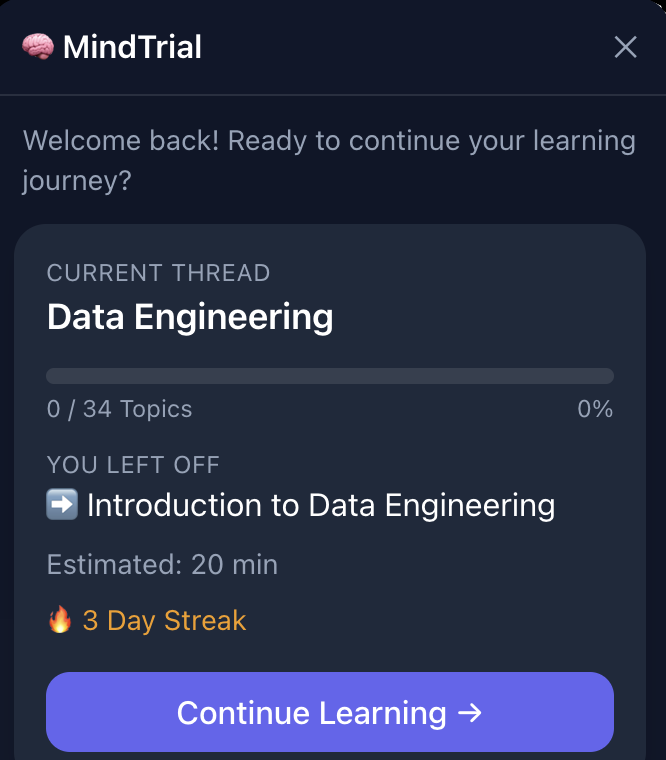
It looks like part of ChatGPT, because it lives there.
The Reminder Card floats above the page, the topic list scrolls below it, and the whole thing follows chatgpt.com's own dark UI.
- Animated progress bar per thread
- Full topic list with one-click complete
- Streak counter for consecutive days
- Collapses to a floating button when you don't need it
Built for threads, not just to-dos
Every piece exists to answer one question fast: what's next?
Multiple threads
Run separate learning paths at once — a language, a certification, a side skill — without them tangling.
Full topic management
Create, rename, reorder, delete, and mark topics complete inside the sidebar. No spreadsheet required.
Context-aware prompts
Continue Learning doesn't just say "continue" — it names the thread and topic so ChatGPT picks up correctly.
Streaks
A quiet counter for consecutive days studied — enough to notice a gap, not enough to nag.
Floating button
Dismiss the card and a small button stays put, ready to reopen it without hunting for a menu.
Optional AI topic lists
Paste a transcript and have topics generated for you — the only feature that talks to a server, and only when you ask it to.
Where your data goes
By default: nowhere. Threads, topics, progress, and settings are stored in your
browser's localStorage, scoped to chatgpt.com. No account, no sign-in, no analytics. We
can't read it — there's no server-side database to read it from.
The one exception: the optional "generate topics from transcript" feature sends the transcript you submit to our backend, which forwards it to Groq's API to produce a topic list, then returns the result to your browser. Nothing is logged or stored on our side, and this only runs when you explicitly trigger it.
Full details in the Privacy Policy — data storage, third parties, and contact info.
Get MindTrial
Available now on the Chrome Web Store. One click, no setup.
React 18 · TypeScript · Vite · Tailwind CSS · Framer Motion · Manifest V3